Futures Trading Control Plane · Topstep · ProjectX
Futures TradingControl Plane
PitStrike Terminal for Topstep evaluation and funded workflows — wired for ProjectX-connected accounts. PitStrike Risk Engine, PitStrike AI, and PitStrike Journal on one spine — not retail stock apps.
No generic brokerage pitch. Live market context, bracket-aware execution logic, and a single operating surface when your process runs through Topstep and ProjectX.
For Topstep traders and ProjectX-connected users only.
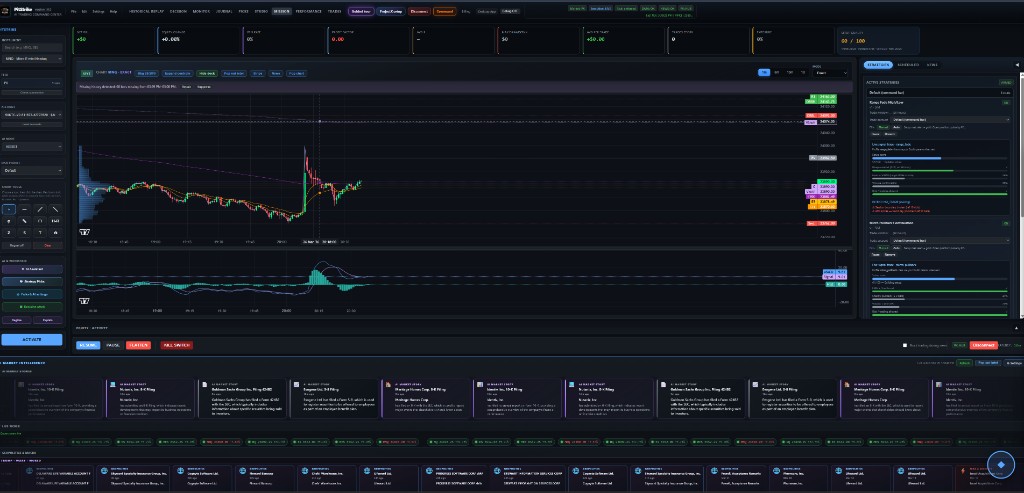
Production command center layout — chart cockpit, strategy panel, and market intelligence strip as shipped in the live terminal.
Click image to view full size.
Start here
If you already trade Topstep + ProjectX-shaped workflows
Scattered charts, news, and notes → one PitStrike Terminal operating surface.
Memory-based review → PitStrike Journal with execution and risk events on a timeline.
Ungoverned AI hype → PitStrike AI briefings evaluated under PitStrike Risk Engine policy.
Market context flows into execution awareness; PitStrike Risk Engine evaluates policy; PitStrike AI briefs inside those guardrails; PitStrike Journal records the trail.
PitStrike AI does not bypass PitStrike Risk Engine; PitStrike Journal persists structured events for review.
Why PitStrike exists
Serious traders rarely fail because they lack indicators. They fail because tools are fragmented, session reality is off-screen, and review is memory-based instead of evidence-based.
PitStrike exists to unify execution context, PitStrike Risk Engine policy, PitStrike AI readouts, and PitStrike Journal evidence on one Futures Trading Control Plane — so decisions and review share one spine.
Know exactly what this is before you go deeper.
PitStrike is a Futures Trading Control Plane: PitStrike Terminal brings charts, market context, strategy tooling, and execution awareness together with PitStrike Risk Engine guardrails, PitStrike AI briefings, and PitStrike Journal memory — in one desktop-grade workspace.
It is designed around Topstep evaluations and funded accounts, with connectivity and account state aligned through ProjectX where that is your path.
Not a stock app, not a generic brokerage pitch. If your workflow is not Topstep- and ProjectX-shaped, this product will feel intentionally narrow — on purpose.
Built for Topstep
Built around evaluation and funded futures workflows — not buy-and-hold equities, not casual “investing” UX.
Session rules, flatten windows, and combine-aware risk are treated as first-class: what you need to respect shows up in the shell, not only in a rule PDF you read once.
Powered through ProjectX
When your account path runs through ProjectX, PitStrike is meant to sit on the same side of the wire: credentials, connectivity, and trading context stay aligned with how you actually operate.
If your stack is not ProjectX-connected, you will not get a magically “universal” broker — the integrations and assumptions here are explicit, not hidden.
Guarded, not reckless
PitStrike AI helps you frame context, compare scenarios, and read signals — it does not override PitStrike Risk Engine or replace your risk policy, and it does not flip switches behind your back.
Brackets, limits, vetoes, and audit-friendly guardrails stay in charge. If a path violates policy, the system is built to say so clearly, not to “helpfully” route around it.
Less noise. More operating clarity.
A strong setup dies on bad process: wrong screen, wrong context, missed cutoffs. You need one surface that respects session reality and how Topstep accounts actually behave.
Tools scattered across tabs and vendors
Thin context at the moment of decision
Rushed entries, weak exits
AI that is not grounded in your risk rules
News, chart, strategy, and risk living in different places
Session cutoffs and flatten windows treated as an afterthought
No single command layout for how you run size and risk
PitStrike Terminal — one command surface
Chart, news, strategies, performance, execution — in one layout built for operators who already think in Topstep and ProjectX terms.
Market structure Live charts and timeframes with session context, not toy charts.
News & macro Intelligence strip sized for how you scan headlines before a trade.
Strategy overlays Signals tied to what you configure — not random indicators.
Performance review Equity and stats you can actually use in review.
Representative layout: chart cockpit, dock, and intelligence in one workspace. Your live terminal reflects your data feed and configuration.
AI trade framing Context and explanation — not a magic button.
Risk policy enforcement Vetoes you can read and audit.
Execution awareness Lifecycle visibility from intent through fills.
Desktop-ready Same UI in the Windows shell when you want native chrome.
PitStrike AI explains. PitStrike Risk Engine decides.
PitStrike AI summarizes context, surfaces setups, and explains signals. It does not place trades or override policy — PitStrike Risk Engine stays in charge.
PitStrike AI lane
Briefing-style readouts: regime context, structure, what matters now — without promising outcomes.
1AI proposes analysis and framing from live context.
2PitStrike Risk Engine evaluates against policy and hard rules.
3Only compliant paths stay illuminated — vetoes are real.
PitStrike Risk Engine
Brackets, limits, and guardrails are not “suggestions.” They are the control plane.
AI can help frame the trade. It is not allowed to break the rules.
Demo preview.
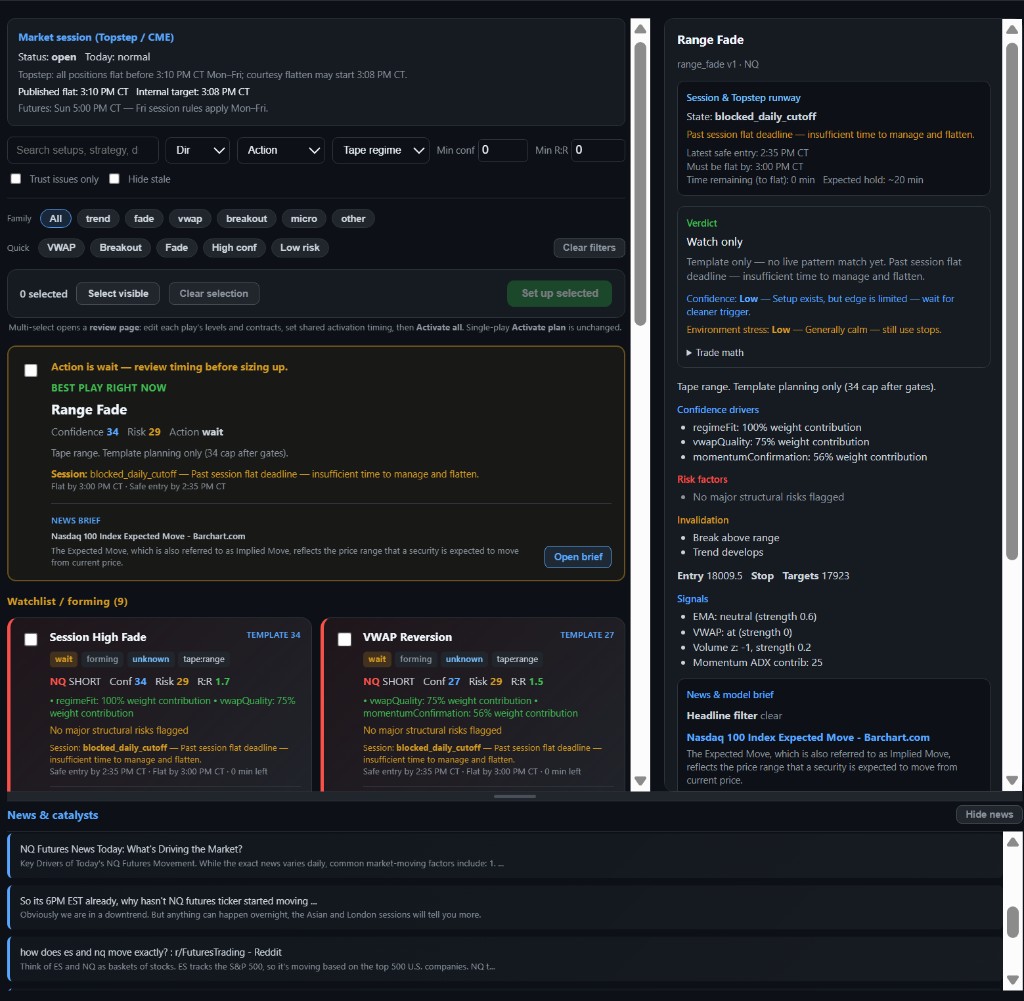
Representative AI Strategy Picks layout — what you can open in the terminal after you connect your account and live market data is available.
Illustrative capture for the landing page; your symbols, sessions, and headlines follow your feed once connected.
Session rules beat wishful trading.
Built for traders who run against real clocks: RTH vs globex, flatten windows, end-of-day behavior, and close-before-cutoff discipline — not “set and forget.”
Session timing Respect the clock you actually trade against.
Market windows Know when context is actionable vs noise.
Lifecycle From intent to exit — fewer “orphaned” decisions.
Cutoff discipline Close-before-cutoff awareness for real accounts.
Who it’s for — and who it’s not for
For
Topstep traders
Futures traders using ProjectX-connected workflows
Users who want AI context without losing risk discipline
Traders who want a command-center, desktop-grade operating surface
Not for
Beginner investors or “set and forget” stock portfolios
Crypto meme traders or generic app tourists
Anyone expecting a consumer brokerage like Robinhood
Users without a compatible Topstep / ProjectX workflow
PitStrike Journal — your trading memory, not just a notebook
Most traders remember outcomes. PitStrike records the decisions that led there.
A structured timeline combining AI activity, execution, risk, notes, saved context, and thesis into one review surface.
One timeline for the full session lifecycle
PitStrike Journal is a unified session memory: PitStrike AI signals, execution, PitStrike Risk Engine controls, notes, saved stories, and thesis — tied to how you actually move through a session, not scattered across tabs.
It is backed by structured event data (not disposable notes), scoped to your active org. Rows live in execution_events — the same audit pipeline the terminal writes to.
What you can do with it
Review the session
Walk intent, fills, risk pressure, AI readouts, and post-trade notes in sequence — a decision trail, not a screenshot folder.
Capture context fast
Quick notes, saved headlines, symbols, tags — log what mattered while the tape is still fresh.
Build thesis over time
Structured thesis entries with symbols and stance so recurring observations compound instead of evaporating.
Replay-linked context
Saved rows can reference replay runs so you can reconnect what happened with what you were thinking.
Search real history
Filter by symbol, type, timeframe, or keyword — pull prior behavior instead of relying on memory.
Copilot with receipts
Assistant tools read the same journal model — summaries and follow-ups grounded in execution + risk + AI context, not vague chat.
What gets saved
The timeline is not a front-end-only list. Substantive state is persisted for the org; transient UI chrome is not.
Saved
Quick notes
Saved stories
Story feedback
Theses
AI activity events
Trading and execution events
Risk and trading-control events
Replay-linked journal rows
Other audit events on the shared pipeline
Not saved as journal rows
Active tab state
Scroll position
Calendar popover state
Temporary filter UI state
Other purely client-side visual state
Why this matters in real trading
Most people remember outcomes and forget process. The Journal preserves process: whether a decision came from plan, drift, emotion, AI influence, risk pressure, or late-session fatigue — so review is evidence, not guesswork.
See the Journal in action
Open the live workspace to explore the full timeline: filters, saved stories, thesis rows, replay-linked context, AI activity, and risk signals.
Saved user preview
Open the full Journal workspace
Full terminal Journal dock — demo data so you can click through without signing in.
Pricing
Same numbers as in-app billing: Free to learn, Pro for daily execution, Elite for high-output workflows. Cancel anytime; payments run through Stripe when billing is enabled.
If this matches how you operate, the terminal is one click away.
Web app available. Checking desktop installer status.
The desktop build is not available yet. Join the waitlist or check back after release.
Built for Topstep traders and ProjectX-connected users. PitStrike is not a generic brokerage. AI does not override risk controls. Futures trading carries substantial risk and is not suitable for everyone.
This page is not investment advice. Past performance does not guarantee future results.